Login Page
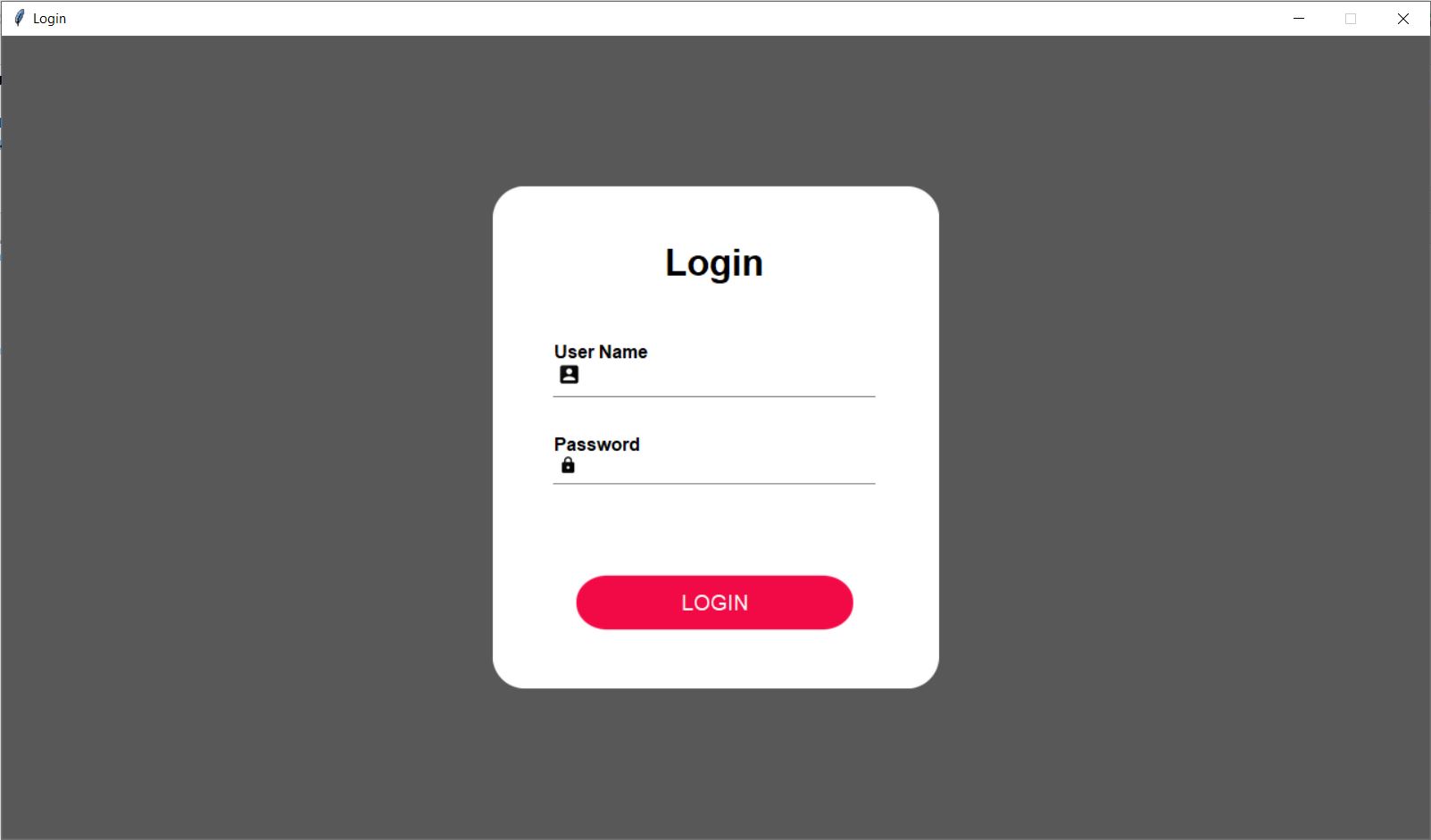
        root = self.winfo_toplevel()
        root.title("Login")
        root.configure(bg="#585858")
        root.resizable(width=0, height=0)
        win_width = 1280
        print(1280 * 56.25 / 100)
        win_height = int(1280 * 56.25 / 100)
        root.geometry(str(win_width) + "x" + str(win_height))

        root.attributes('-alpha', 0.0)
        Util.center(root)
        root.attributes('-alpha', 1.0)

        check_login(root)

        width = 400
        height = 450
        cornerradius = 40
        padding = 0
        color = "#FFFFFF"
After creation of window, we will add a canvas background.
    bg_canvas = RoundBackgroundFrame(root, width, height, padding, cornerradius, color, "#585858")
    bg_canvas.place(width=width, height=height, x=win_width / 2 - width / 2, y=win_height / 2 - height / 2)


    class RoundBackgroundFrame(tk.Canvas):

        def __init__(self, parent, width, height, padding, cornerradius, color, bg):
            tk.Canvas.__init__(self, parent, borderwidth=0, relief="flat", highlightthickness=0, bg=bg)

            original = Image.open("images/corner.png")
            resized = original.resize((int(40), int(40)), Image.ANTIALIAS)
            self.image_r_t = ImageTk.PhotoImage(resized)

            original = original.rotate(90, expand=0)
            resized = original.resize((int(40), int(40)), Image.ANTIALIAS)
            self.image_l_t = ImageTk.PhotoImage(resized)

            original = original.rotate(90, expand=0)
            resized = original.resize((int(40), int(40)), Image.ANTIALIAS)
            self.image_l_b = ImageTk.PhotoImage(resized)

            original = original.rotate(90, expand=0)
            resized = original.resize((int(40), int(40)), Image.ANTIALIAS)
            self.image_r_b = ImageTk.PhotoImage(resized)

            self.shape(width, height, padding, cornerradius, color)
            (x0, y0, x1, y1) = self.bbox("all")
            width = (x1 - x0)
            height = (y1 - y0)
            self.configure(width=width, height=height)

        def shape(self, width, height, padding, cornerradius, color):
            self.create_polygon((padding, height - cornerradius - padding, padding, cornerradius + padding,
                        padding + cornerradius, padding, width - padding - cornerradius, padding,
                        width - padding, cornerradius + padding, width - padding,
                        height - cornerradius - padding, width - padding - cornerradius, height - padding,
                        padding + cornerradius, height - padding), fill=color, outline=color)

            self.create_image(width - self.image_r_t.width(), 0, image=self.image_r_t, anchor=NW)
            self.create_image(0, 0, image=self.image_l_t, anchor=NW)
            self.create_image(0, height - self.image_l_b.width(), image=self.image_l_b, anchor=NW)
            self.create_image(width - self.image_r_b.width(), height - self.image_r_b.width(), image=self.image_r_b,anchor=NW)
        width = width * 92 / 100
        height = height * 92 / 100
        base_frame = Frame(width=width, height=height, bg=color)
        bg_canvas.create_window(width * 4 / 100, height * 4 / 100, anchor=NW, window=base_frame)
        label_login = Label(base_frame, text="Login", font=font.Font(family="Lucida Grande", size=25, weight='bold'),bg=color)
        label_login.place(width=width - 20, x=10, y=height * 0.07)
    # Login UI
       self.ce_username = CustomEntry(base_frame, 300, 55, 10, 2, color, "User Name", "images/ic_user_black.png")
        self.ce_username.place(x=width / 2 - 150, y=height * 0.30)

        self.ce_pwd = CustomEntryPWD(base_frame, 300, 50, 10, 2, color, "Password", "images/ic_lock_black.png")
        self.ce_pwd.place(x=width / 2 - 150, y=height * 0.50)

        button = RoundedButton(base_frame, 250, 130 / 2.56, color, "images/button3.png", "LOGIN",
                               font=("Lucida Grande", 14),
                               command=lambda: self.login_click(root))
        button.place(x=width / 2 - 250 / 2, y=height * 0.80)
Here is our class CustomEntrySimple:
    class CustomEntrySimple(tk.Canvas):

        def __init__(self, parent, width, height, font, color, text):
            tk.Canvas.__init__(self, parent, borderwidth=0, relief="flat", highlightthickness=0, bg=color)

            self.width = width
            self.height = height
            self.color = color

            self.create_text(6, 5, anchor=W, font=font, text=text, fill="#000000")
            self.create_line(5, height - 8, width - 5, height - 8, fill="#808080")

            frame = Frame(parent,width=width * 95 / 100, height=height * 50 / 100)
            self.entry = Entry(frame, bg=color, bd=0, highlightthickness=0, font=font)

            self.entry.place(relwidth=1, relheight=1, x=0, y=0)

            self.create_window(6, height / 2 - (height * 50 / 100) / 2, anchor=NW, window=frame)
            self.update()

            (x0, y0, x1, y1) = self.bbox("all")
            width = (x1 - x0)
            height = (y1 - y0)
            self.configure(width=width, height=height)
We have done with all UI part now we will start functionality part.
    # Login Click

    def login_click(self, root):

        db = Util.connect_db()
        cursor = db.cursor()

        staff_id = self.ce_username.entry.get()
        staff_pass = self.ce_pwd.entry.get()

        cursor.execute('SELECT staff_pass, staff_name FROM staff WHERE staff_id IS ?', (staff_id,))
        sql_output = cursor.fetchall()
        print(sql_output)
        staff_list = [item[0] for item in sql_output]

        key = "ADMIN_ID"
        cursor.execute('SELECT value FROM system_info WHERE key IS ?', (key,))
        rows = cursor.fetchone()

        admin_id = rows[0]

        key = "ADMIN_PASS"
        cursor.execute('SELECT value FROM system_info WHERE key IS ?', (key,))
        rows = cursor.fetchone()
        print(rows[0])
        admin_pwd = rows[0]

        if len(staff_list) > 0:
            if staff_pass == staff_list[0]:
                AppConstant.STAFF_ID = staff_id
                AppConstant.STAFF_NAME = [item[1] for item in sql_output][0]

                key_is_logined = "IS_LOGINED"
                cursor.execute("UPDATE system_info SET value = ? WHERE key = ?",
                               (TRUE, key_is_logined,))

                key_id = "LOGINED_ID"
                cursor.execute("UPDATE system_info SET value = ? WHERE key = ?",
                               (staff_id, key_id,))

                key_pwd = "LOGINED_PWD"
                cursor.execute("UPDATE system_info SET value = ? WHERE key = ?",
                               (staff_pass, key_pwd,))

                db.commit()

                self.ce_username.entry.delete(0, 'end')
                self.ce_pwd.entry.delete(0, 'end')

                navigate_to_billing(root)

        elif admin_id == staff_id and admin_pwd == staff_pass:
            navigate_to_dashboard(root)

        else:
            messagebox.showerror(title="Error", message="Incorrect Id or Password")
    class Util:

        @staticmethod
        def connect_db():
            db = None
            try:
                db = sql.connect("inventry.db")
                return db
            except sql.Error as error:
                print("Failed to insert data into sqlite table", error)
    def navigate_to_dashboard(root):
    root.withdraw()
    Dashboard(root)
    #root.mainloop()

def navigate_to_billing(root):
    root.withdraw()
    Billing(root)

def check_login(root):
    db = Util.connect_db()
    cursor = db.cursor()

    key_id = "IS_LOGINED"
    cursor.execute('SELECT value FROM system_info WHERE key IS ?', (key_id,))
    rows = cursor.fetchone()
    is_logined = rows[0]

    if is_logined == "1":
        key_id = "LOGINED_ID"
        cursor.execute('SELECT value FROM system_info WHERE key IS ?', (key_id,))
        rows = cursor.fetchone()
        staff_id = rows[0]
        AppConstant.STAFF_ID = staff_id

        cursor.execute('SELECT staff_name FROM staff WHERE staff_id IS ?', (staff_id,))
        rows = cursor.fetchone()
        staff_name = rows[0]
        print(staff_name)

        AppConstant.STAFF_NAME = staff_name

        navigate_to_billing(root)
Programmer Mirta is for learning and training. Projects might be simple to improve learning. Projects are constantly reviewed to avoid errors, but we cannot assure full correctness of all content. While using Programmer Mitra, you agree to have read and accepted our terms of use, cookie and privacy policy.
Copyright 2021 by Programmer Mitra. All Rights Reserved.