Login
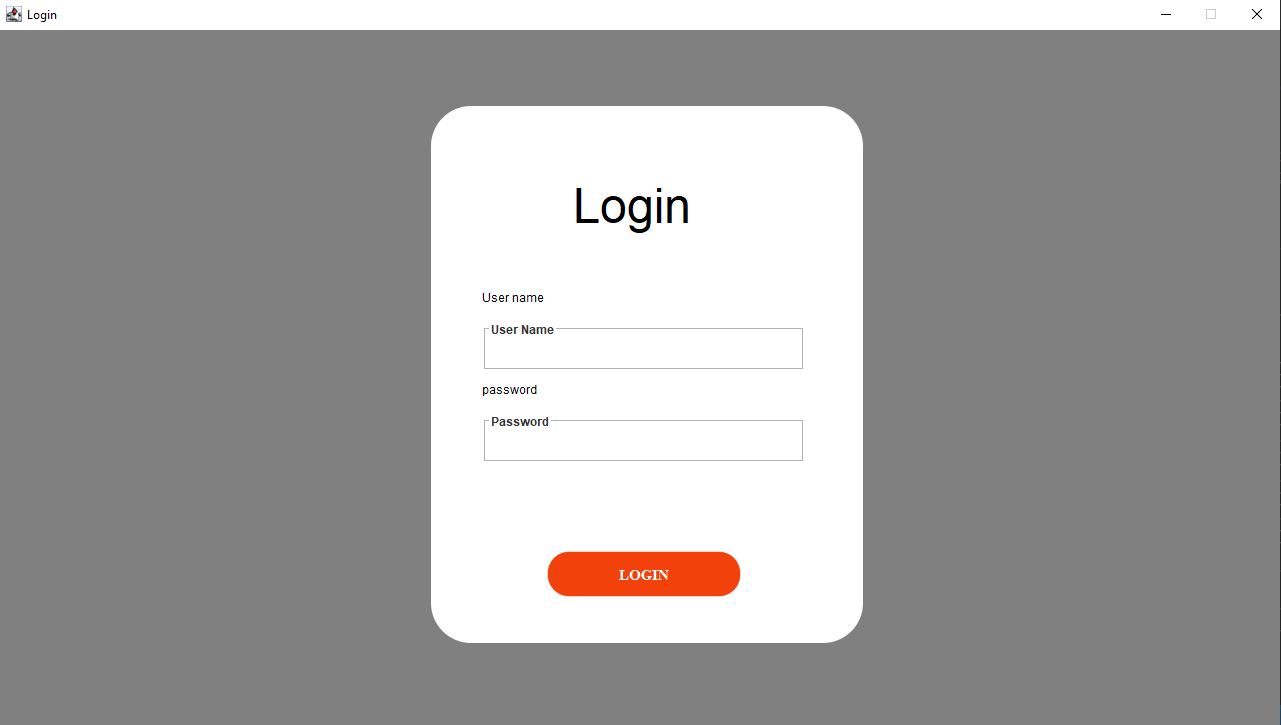
			frame = new JFrame("Login");
	        frame.setDefaultCloseOperation(WindowConstants.EXIT_ON_CLOSE);
	        frame.pack();
			Utils.centeredFrame(frame, winWidth,winHeight, "Login");

	        frame.setVisible(true);
	        frame.setResizable(false);

	        Container mainContainer=frame.getContentPane();
	        mainContainer.setBackground(Color.gray);

	        checkLogin();


	        JPanel panel = new JPanel();
	        panel.setLayout(null);
		    panel.setOpaque(false);
		    panel.setBackground(Color.BLACK);
		    panel.setSize(new Dimension(winWidth/3,winHeight*7/10));
		    panel.setLocation(winWidth/2-winWidth/6,winHeight/10);
		    mainContainer.add(panel,BorderLayout.CENTER);


		    JComponent jcomponent=new RoundedBackground(winWidth/2-winWidth/6,winHeight/10,winWidth/3,winHeight*7/10);//
	        mainContainer.add(jcomponent,BorderLayout.CENTER);
Here we create Labels and Text Fields.
			JLabel label=new JLabel();
	        label.setText("Login");
	        label.setBackground(Color.red);
	        label.setForeground(Color.black);
	        label.setSize(new Dimension(winWidth/3,winHeight/10));
	        label.setFont(new Font("Lucida",Font.PLAIN,48));
	        label.setAlignmentX(JLabel.CENTER_ALIGNMENT);
	        label.setLocation(winWidth*11/100, winHeight*8/100);
	        panel.add(label, BorderLayout.CENTER);

	        JLabel user_name=new JLabel();
	        user_name.setText("User name");
	        user_name.setBackground(Color.red);
	        user_name.setForeground(Color.black);
	        user_name.setFont(new Font("Lucida",Font.PLAIN,12));
	        user_name.setSize(new Dimension(winWidth/3,winHeight/10));
	        user_name.setLocation(winWidth*4/100, winHeight*20/100);
	        panel.add(user_name, BorderLayout.SOUTH);
	        Border loweredetched = BorderFactory.createEtchedBorder(EtchedBorder.LOWERED);

	        TitledBorder usernametittle = BorderFactory.createTitledBorder(loweredetched, "User Name");
	        usernametittle.setTitleJustification(TitledBorder.LEFT);

            TitledBorder passwordTittled = BorderFactory.createTitledBorder(loweredetched, "Password");
            passwordTittled.setTitleJustification(TitledBorder.LEFT);

	        usernameField = new JTextField();
	        usernameField.setSize(new Dimension(winWidth/4,winHeight/15));
	        usernameField.setLocation(winWidth*4/100, winHeight*28/100);
	        usernameField.setBorder(usernametittle);
	        panel.add(usernameField,BorderLayout.CENTER);

	        panel.validate();
	        panel.repaint();

	        JLabel password=new JLabel();
	        password.setText("password");
	        password.setBackground(Color.red);
	        password.setForeground(Color.black);
	        password.setFont(new Font("Lucida",Font.PLAIN,12));
	        password.setSize(new Dimension(winWidth/3,winHeight/10));
	        password.setLocation(winWidth*4/100, winHeight*32/100);
	        panel.add(password, BorderLayout.SOUTH);

	        passwordField = new JPasswordField();
	        passwordField.setSize(new Dimension(winWidth/4,winHeight/15));
	        passwordField.setLocation(winWidth*4/100, winHeight*40/100);
	        panel.add(passwordField,BorderLayout.CENTER);
	        passwordField.setBorder(passwordTittled);

	        panel.validate();
	        panel.repaint();
Here we create "LOGIN" Button and adding a actionlistener on it.
			JButton loginButton = new JButton(new ImageIcon(((new ImageIcon("images/button40.png")).getImage()).getScaledInstance(winWidth*15/100,winHeight*6/100, java.awt.Image.SCALE_SMOOTH)));
	        loginButton.setContentAreaFilled(false);
	        loginButton.setBorder(null);
	        loginButton.setText("LOGIN");
	        loginButton.setHorizontalTextPosition(JButton.CENTER);
	        loginButton.setVerticalTextPosition(JButton.CENTER);
	        loginButton.setOpaque(false);
	        loginButton.setContentAreaFilled(false);
	        loginButton.setBorderPainted(false);
	        loginButton.setFont(new java.awt.Font("Serif",1, 15));
	        loginButton.setForeground(Color.white);
	        loginButton.setBounds(winWidth*9/100,winHeight*58/100,winWidth*15/100,winHeight*6/100);
	        panel.add(loginButton);
	        loginButton.addActionListener(new ActionListener() {
	            @Override
	            public void actionPerformed(ActionEvent ae) {

	            	 String usernameString = usernameField.getText();
	            	 String passString = passwordField.getText();
	            	 String dbUserName = "";
	            	 String dbPassword = "";
	            	 String key1 = "ADMIN_ID";
	            	 String key2 = "ADMIN_PASS";

	            	 if(!usernameString.isEmpty() && !passString.isEmpty()) {
	            		 conn = SqliteConnection.ConnectDb();
	            	 try {
						insert = conn.prepareStatement("SELECT value FROM system_setting WHERE key = 'ADMIN_ID'");

						ResultSet rs = insert.executeQuery();

						 while (rs.next()) {
							 dbUserName = rs.getString(1);
					        }

						 insert = conn.prepareStatement("SELECT value FROM system_setting WHERE key = 'ADMIN_PASS'");
						 ResultSet rs2 = insert.executeQuery();

						  while (rs2.next()) {
							 dbPassword = rs2.getString(1);
						     }

					} catch (SQLException e) {
						// TODO Auto-generated catch block
						e.printStackTrace();
					}

	            	 System.out.println(usernameString + dbUserName + passString + dbPassword);
	            	 System.out.println(usernameString.equals(dbUserName) && passString.equals(dbPassword));


					if( usernameString.equals(dbUserName) && passString.equals(dbPassword)) {

						String key_is_logined = "IS_LOGINED";

					            try {

									insert = conn.prepareStatement("UPDATE system_setting "
							                + "SET value = ? "
							                + "WHERE key = ?");
									insert.setString(1, "1");
									insert.setString(2, key_is_logined);
									insert.executeUpdate();
									conn.close();
								} catch (SQLException e3) {
									// TODO Auto-generated catch block
									e3.printStackTrace();
								}

					            navigate_to_dashboard();

					}else {
						JOptionPane.showMessageDialog(frame, "Unmatched");
					}

	            }else {
	            	String var = "Usdername Should not be empty,  Password Should not be empty";
	            	JOptionPane.showMessageDialog(frame, var);
	            }


	            }
	        });


	        panel.revalidate();
	        panel.repaint();

	 }
	private void checkLogin() {


		 String key_id = "IS_LOGINED";
		 String loginKey = "";
		 String adminId = "";

		 conn = SqliteConnection.ConnectDb();
    	 try {
			insert = conn.prepareStatement("SELECT value FROM system_setting WHERE key = 'IS_LOGINED'");

			ResultSet rs = insert.executeQuery();

			 while (rs.next()) {
				 loginKey = rs.getString(1);
		        }

			 if(loginKey.equals("1")) {

				 insert = conn.prepareStatement("SELECT value FROM system_setting WHERE key = 'ADMIN_ID'");

					ResultSet rs2 = insert.executeQuery();

					 while (rs2.next()) {
						 adminId = rs2.getString(1);
				        }
					 conn.close();

					 AppConstant.STAFF_NAME = adminId;
					 navigate_to_dashboard();
			 }


    	 } catch (SQLException e) {
				// TODO Auto-generated catch block
				e.printStackTrace();
		}

	 }

	 private void navigate_to_dashboard() {
		 new DashboardNew(frame);
	 }
Programmer Mirta is for learning and training. Projects might be simple to improve learning. Projects are constantly reviewed to avoid errors, but we cannot assure full correctness of all content. While using Programmer Mitra, you agree to have read and accepted our terms of use, cookie and privacy policy.
Copyright 2021 by Programmer Mitra. All Rights Reserved.