Login
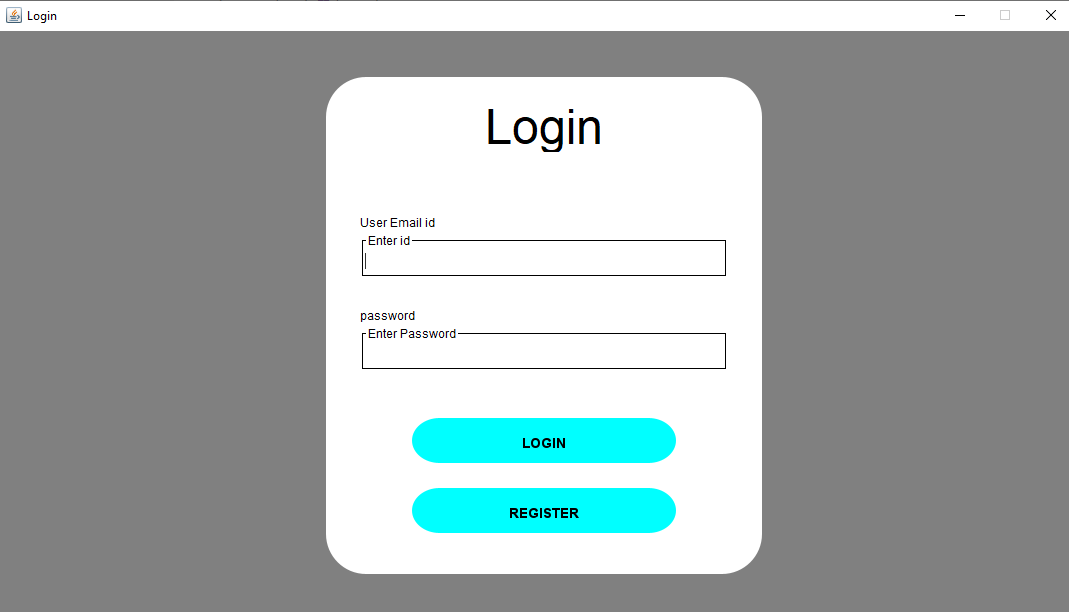
    // frame with control options
		loginFrame = new JFrame();
		Util.centeredFrame(loginFrame, windowWidth, windowHeight, "Login");
		loginFrame.setDefaultCloseOperation(JFrame.EXIT_ON_CLOSE);
		loginFrame.setResizable(false);

		Container frameContainer = loginFrame.getContentPane();
		frameContainer.setBackground(Color.gray);

		// Changeable According to What size of screen You Want?

		int containerWidth = windowWidth*40/100;
		int containerHeight = windowHeight *80/100;


		int panelWidth = containerWidth*94/100;
		int panelHeight = containerHeight*94/100;
		int posX = windowWidth / 2 - panelWidth / 2;
		int posY = windowHeight / 2 - panelHeight / 2 - frameControllerSize / 2;

		// frame without control options
		JPanel panel = new JPanel();
		panel.setLayout(null);//new BorderLayout());
		panel.setBackground(Color.WHITE);
		panel.setSize(new Dimension(panelWidth,panelHeight));
		panel.setLocation(posX, posY);
		frameContainer.add(panel);
After creation of window, we will add a canvas background.
    // for Rounded Background
	posX = windowWidth / 2 - containerWidth / 2;
	posY = windowHeight / 2 - containerHeight / 2 - frameControllerSize / 2;
	JComponent jcomponent = new RoundedBackground(posX, posY, containerWidth, containerHeight);
	jcomponent.setLayout(null);
	frameContainer.add(jcomponent, BorderLayout.CENTER);

    public class RoundedBackground extends JComponent {


	    private static final long serialVersionUID = 1L;
	        int width, height,setX,setY;

            public RoundedBackground (int setX,int setY,int width, int height) {
    	        this.width=width;
    	        this.height=height;
    	        this.setX=setX;
    	        this.setY=setY;

                setSize(width, height);
            }

        @Override
        public void paint(Graphics g) {
            Graphics2D g2 = (Graphics2D) g;
            g2.setRenderingHint(RenderingHints.KEY_ANTIALIASING,RenderingHints.VALUE_ANTIALIAS_ON);
            g2.setPaint(Color.white);


            double x = setX;
            double y = setY;
            double w = width;
            double h = height;
            RoundRectangle2D round=new RoundRectangle2D.Double(x, y, w, h, 80, 80);
            g2.fill(round);

        }


    }
Here we create Labels and Text Fields.
        // for heading Layout
		posY = panelHeight * 2/100;
		Font font = new Font("Lucida", Font.PLAIN, 48);
		JLabel label = new JLabel();
		label.setText("Login");
		label.setFont(font);
		label.setForeground(Color.black);
		label.setSize(new Dimension(panelWidth, panelHeight / 9));
		label.setHorizontalAlignment(JLabel.CENTER);
		label.setLocation(0, posY);
		panel.add(label);


        // user Name
		int labelWidth = panelWidth*90/100;
		posX = panelWidth*5/100;
        posY = panelHeight *23/100;
        font = new Font("Lucida",Font.PLAIN,12);
        JLabel user_name=new JLabel();
        user_name.setText("User Email id");
        user_name.setBackground(Color.red);
        user_name.setForeground(Color.black);
        user_name.setFont(font);
        user_name.setSize(new Dimension(labelWidth,panelHeight/10));
        user_name.setLocation(posX, posY);
        panel.add(user_name);


        font = new Font("Lucida",Font.PLAIN,12);
        Border borderline = BorderFactory.createLineBorder(Color.black);
        TitledBorder tittleBorder = BorderFactory.createTitledBorder(borderline);
	    tittleBorder.setTitleJustification(TitledBorder.LEFT);
	    tittleBorder.setTitleFont(font);
	    tittleBorder.setTitle("Enter id");
	    tittleBorder.setTitleColor(Color.black);


	    posX = panelWidth*5/100;
	    posY = panelHeight *30/100;
	    myTextField = new JTextField();
        myTextField.setSize(new Dimension(labelWidth,panelHeight/10));
        myTextField.setLocation(posX, posY);
        myTextField.setBorder(tittleBorder);
        panel.add(myTextField);

        panel.validate();
        panel.repaint();


        // User Password
        posY = panelHeight *43/100;
        JLabel password=new JLabel();
        password.setText("password");
        password.setBackground(Color.red);
        password.setForeground(Color.black);
        password.setFont(font);
        password.setSize(new Dimension(labelWidth,panelHeight/10));
        password.setLocation(posX, posY);
        panel.add(password);

        tittleBorder = BorderFactory.createTitledBorder(borderline);
	    tittleBorder.setTitleJustification(TitledBorder.LEFT);
	    tittleBorder.setTitleFont(font);
	    tittleBorder.setTitle("Enter Password");
	    tittleBorder.setTitleColor(Color.BLACK);

        posY = panelHeight *50/100;
        passwoerdField = new JPasswordField();
        passwoerdField.setSize(new Dimension(labelWidth,panelHeight/10));
        passwoerdField.setLocation(posX, posY);
        passwoerdField.setBorder(tittleBorder);
        panel.add(passwoerdField);


        panel.validate();
        panel.repaint();
Now We create "LOGIN" And its logic to login quiz system who already registered in database .
        int btnWidth = panelWidth *65/100;
        int btnHeight = panelHeight *10/100;
        posX = panelWidth / 2 - btnWidth / 2;
        posY = panelHeight *70/100;

        font = new Font("Lucida", Font.BOLD, 14);
        JButton loginBtn = new JButton("Login");
        loginBtn.setBounds(posX,posY, btnWidth, btnHeight);
        loginBtn.setFont(new java.awt.Font("Serif",1, 15));
        loginBtn.setOpaque(false);
        loginBtn.setContentAreaFilled(false);
        loginBtn.setBorderPainted(true);
        loginBtn.setBorder(new RoundedBorder(55, "LOGIN", true, Color.cyan, font));
        loginBtn.setForeground(Color.black);
		panel.add(loginBtn);

        loginBtn.addActionListener(new ActionListener() {
            @Override
            public void actionPerformed(ActionEvent ae) {
            	String emailString = myTextField.getText();
            	String passString = passwoerdField.getText();

            	if(emailString.isEmpty() || passString.isEmpty()) {
            		JOptionPane.showMessageDialog(loginFrame, "Incorrect id or Password");

            	} else {
            		try {
            			Connection conn = null;
            			Statement stmt = null;
            			ResultSet rs = null;
            			try {
            				conn = SQLiteJDBCDriverConnection.connect();
            				stmt = conn.createStatement();
            				String sql = "SELECT user_name , user_password FROM user_data WHERE user_email_id = "+ "'"+ emailString +"'"+" AND user_password = "+"'"+passString+"'";


            				rs = stmt.executeQuery(sql);


            				if (rs.next() == false) {
            					JOptionPane.showMessageDialog(loginFrame, "Incorrect id or Password");

            				} else {

            						AppConstant.USER_NAME = rs.getString("user_name");
            						AppConstant.USER_PASSWORD =rs.getString("user_password");
            						myTextField.setText("");
            						passwoerdField.setText("");
            					    moveToDashboard(loginFrame);
            				}

            			} catch (SQLException e) {
            				System.err.println("Got an exception! ");
            				System.err.println(e.getMessage());

            			} finally {
            				// you should release your resources here
            				if (rs != null) {
            					rs.close();
            				}
            				if (stmt != null) {
            					stmt.close();
            				}
            				if (conn != null) {
            					conn.close();
            				}
            			}

            		} catch (SQLException e) {
            			System.out.println(e.getMessage());
            		}
            	}
            }
        });
        posY = panelHeight *85/100;
        JButton addUserBtn = new JButton("REGISTER");
	    addUserBtn.setBounds(posX,posY, btnWidth, btnHeight);
		addUserBtn.setOpaque(false);
		addUserBtn.setContentAreaFilled(false);
		addUserBtn.setBorderPainted(true);
		addUserBtn.setBorder(new RoundedBorder(55, "REGISTER", true, Color.cyan, font));
		addUserBtn.setForeground(Color.black);
		panel.add(addUserBtn);

		addUserBtn.addActionListener(new ActionListener() {

			@Override
			public void actionPerformed(ActionEvent e) {

					moveToRegister(loginFrame);
			}
		});
    //Go to Dashboard
    private void moveToDashboard(Frame loginFrame) {
		DashboardNew window = new DashboardNew(screenSize);
		window.getFrame().setVisible(true);
		loginFrame.dispose();
	}


    //Go to Registration page
	private void moveToRegister(Frame loginFrame) {
		AddUser window = new AddUser(screenSize);
		window.getFrame().setVisible(true);
		loginFrame.dispose();
	}
Programmer Mirta is for learning and training. Projects might be simple to improve learning. Projects are constantly reviewed to avoid errors, but we cannot assure full correctness of all content. While using Programmer Mitra, you agree to have read and accepted our terms of use, cookie and privacy policy.
Copyright 2021 by Programmer Mitra. All Rights Reserved.